- Reduces the number of HTTP requests - Reducing the number of components to be downloaded.
- Moving stylesheets to the document HEAD - makes pages load faster.
- Move scripts from the top to as low in the page as possible - enable progressive rendering.
- Avoid CSS expression.
- Reduce DNS lookup.
- Avoid page redirect.
- Clean Scripts code - remove duplicate code.
Tuesday, September 18, 2007
Improve pages performance - 2 cents
Sunday, August 19, 2007
Javascript files Directory Structure
 Currently there does not exist any standard structure for javascript files directory. In here, I just follow the Java file structure and create a similar file structure for javascript.
As you see, I create a dir 'javascript' which is used to hold all of JS files. And I also create a project related dir 'FEYA' which is used to hold all of my JS file. Any 3rd-party JS lib are parallel to this dir.
Under 'FEYA' dir, 'FEYA.js' is used to define namespace. Any other my JS file will call it to define package. And here comes my example html code to include those JS files:

Tuesday, July 24, 2007
Javascript package/public/private method
Perhaps a very uncommon approach to developing web applications that require JavaScript is namespacing your scripts. And how to define a scope (public/private) to the method and variable. This blog introduces a simple singleton pattern for achieving this discipline.
 First I define a base JS class which will be included in any page to define a package (or you can call it 'namespace'). See right figure for detail source code.
Second, I will call this method in any JS class - define the package just like java class.
 First I define a base JS class which will be included in any page to define a package (or you can call it 'namespace'). See right figure for detail source code.
Second, I will call this method in any JS class - define the package just like java class.
/**Third, I can call following public functions from any JS class.
* Copyright(c) 2006-2007 ...
*/
package("FEYA.util");
/**
* This JS is used to define a bunch of util class
*
* @author fzhuang
* @Date July 26, 2007
*/
FEYA.util.common = function(){
// private variable/function. Not accessible from outside
var count = 0;
var increaseCount = function(){count++;};
// Priviledged method. Can be called from outside
return {
formatDate: function(value){
return value ? value.dateFormat('D, M d Y') : '';
}
}
}();
FEYA.util.common.formatDate
Saturday, June 16, 2007
YUI-Ext tutorial for List, create, update, delete
 Today I posted the following tutorial in YUI-EXT, please see the link:
Using Ext grid + form + dialog to achieve paging list, create, edit, delete function
This tutorial mainly focus on using EXT grid/form/dialog functions to achieve general paging action (list, create, update, delete). It provides a different pattern to build page instead of J2EE MVC pattern.
Thursday, May 10, 2007
Web 2.0 application: Ajax replace MVC framework
We have played Struts/JSF/Spring/hibernate for Enterprise application, doing transaction etc for a while. Now it is time move to web 2.0 (readable) and face AJAX.
In web application, Struts/JSF MVC framework are pretty popular. However, Ajax-based web application can make this process simpler. As the following figure shows, Ajax based application only need a simple servelet to transfer data. Compare with MVC framework, this is a small job. At the same time, a good Ajax Util framework will create rich GUI in the client browser with simple javascript/html code. In general Ajax can be separated as 3 parts:

First part is client-side Ajax, such as animation, drag-and-drop, rich editor etc. YUI, dojo, rico provide lots of great examples.
Second part is the bridge between browser side and Java server side, like bunch of RPC frameworks, DWR, prototype, YUI etc.
Third part is general Ajax Util framework (templates) which can be applied to most applications, such as search function, paging function, CRUD/List function etc. We can think them as glue tool between browser and server, and it will dramatically reduce code by using those utils. YUI extension provides great example for this.
In web application, Struts/JSF MVC framework are pretty popular. However, Ajax-based web application can make this process simpler. As the following figure shows, Ajax based application only need a simple servelet to transfer data. Compare with MVC framework, this is a small job. At the same time, a good Ajax Util framework will create rich GUI in the client browser with simple javascript/html code. In general Ajax can be separated as 3 parts:

First part is client-side Ajax, such as animation, drag-and-drop, rich editor etc. YUI, dojo, rico provide lots of great examples.
Second part is the bridge between browser side and Java server side, like bunch of RPC frameworks, DWR, prototype, YUI etc.
Third part is general Ajax Util framework (templates) which can be applied to most applications, such as search function, paging function, CRUD/List function etc. We can think them as glue tool between browser and server, and it will dramatically reduce code by using those utils. YUI extension provides great example for this.
Sunday, April 29, 2007
JSON speed up Ajax
The JavaScript Object Notation, or JSON, is a lightweight syntax for representing data. JSON has structure with nesting of data elements, just as XML does. JSON is also text-based and use Unicode. It is just as readable by humans as XML is. Here comes a simple example for Json:
To create a JSON object in server side with Java. We can use the lib in "json.org". It provides a quick API to parse POJO and list etc. See the following example code:
{"totalCount":2,The big different about JSON and XML is that JSON is a subset of JavaScript. I can use JavaScript's own compiler to do just that by calling eval. Parsing JSON is a one-liner! Moreover, navigating an object synthesized from JSON is identical to navigating any JavaScript object. It's far easier than navigating through the DOM tree.
"results":[{"bh":"100","sm":"hello"},{"bh":"101","sm":"me" }]}
To create a JSON object in server side with Java. We can use the lib in "json.org". It provides a quick API to parse POJO and list etc. See the following example code:
public JSONObject toJSONObject() throws Exception {To parse JSON data from JS in serve side, please see the following example:
JSONObject json = new JSONObject();
json.put("totalCount", totalCount);
JSONArray jsonItems = new JSONArray();
for (Iteratoriter = results.iterator(); iter.hasNext();) {
jsonItems.put(iter.next().toJSONObject());
}
json.put("results", jsonItems);
return json;
}JSONArray jsonArray = JsonUtil.getJsonArray(jsonString);
// JsonUtil.getJsonArray(jsonString) just do this ->
// jsonArray = new JSONArray(jsonString);
// loop through - get from json and update
for (int i = 0; i < jsonArray.length(); i++) {
JSONObject jsonObject = jsonArray.getJSONObject(i);
String id = jsonObject.getString("id");
}
Saturday, April 28, 2007
YUI extension
Jack Slocum launch YUI extension 1.0 recently in extjs.com. It provides a strong framework for Ajax project. YUI extension has the following interesting functions:
Here comes one of my examples:

- Online Grid editor (really convenience one - JSON)
- Dialogs (Message dialog, progress dialog etc)
- Menu (drop menu)
- Tree
- Resizable
- Layout
Here comes one of my examples:

Monday, April 16, 2007
Ajax Request Compare
Currently, there exists several non-commercial AJAX frameworks for request during the development of a dynamic call-center application.
Dojo is a popular, complete open source framework with broad support not only for Web widgets but also other important aspects of Web
application development such as interaction with backend systems.
DWR focus is making browser client/server interaction as simple and natural as possible.
YUI is an extremely rich, well documented, stable, and lush framework for AJAX-based development. YUI code is really professor feeling.
- Prototype
- Dojo
- Direct Web Remoting (DWR)
- Yahoo! User Interface (YUI) Toolkit
- EXT JS
- Google Web Toolkit (GWT)
postMsg : function(url, actId) {
  var myAjax = new Ajax.Request(url,{
  method: 'post',
  parameters: 'actId='+escape(actId),
  onComplete:handlerResult
});
},
Dojo is a popular, complete open source framework with broad support not only for Web widgets but also other important aspects of Web
application development such as interaction with backend systems.
dojo.io.bind({
  url: url,
  method: "post",
  content: {actId: "123456"},
  load: function(type, data, evt){/* callback code */ },
  error: function(type, error){/* error handling callback */ },
  mimetype: "text/plain"
});
DWR focus is making browser client/server interaction as simple and natural as possible.
public class PhoneService {
 public String getCallerName(int callerNumber){...}
}
..script.. type="text/javascript" src="SVProvider/dwr/interface/PhoneService.js ..script..
PhoneService.getCallerName(18003456700, processPBXResponse)
YUI is an extremely rich, well documented, stable, and lush framework for AJAX-based development. YUI code is really professor feeling.
var requestFromObject = YAHOO.util.Connect.asynRequest('post', uri ,
                                                    callback , postData);
var callback = {
   success: handleSuccess
   failure: handleFailure
   argument: {callerName: "N/A"}
};
Ext.Ajax.request({
 url : '../listActivity.do' ,
 params : { action : 'loadData' },
 method: 'GET',
 success: function ( result, request ) {
  Ext.MessageBox.alert('Success', 'Data return from the server: '+ result.responseText);
 },
 failure: function ( result, request) {
  Ext.MessageBox.alert('Failed', 'Successfully posted form: '+action.date);
 }
});
Monday, April 02, 2007
JSF, Spring, iBatis integrate
Recently I created an application with JSF, Spring and iBatis. It seems pretty easy to integrate them together. Following list the system environment:


JSF have the following different features:
A serviceLocator class is created in system to glue the JSF with Spring.


Like other persistence layers, iBATIS strives to ease the development of data-driven applications by abstracting the low-level details involved in database communication, as well as providing higher-level ORM capabilities. iBatis SQL Maps is a straightforward data access tool, working at the SQL level like JDBC code, but externalizing SQL statements and their result and parameter mappings into an XML file. Above figure shows the simple example for iBatis.
- Tomcat - 5.5.23
- Java - 1.5
- JSF - 1.2
- Spring - 2.0.3
- iBatis - 2.3.0
- database - Oracle


JSF have the following different features:
- Swing-like object-oriented Web application development
- Backing-bean management
- Extensible UI component model
- Flexible rendering model
- Extensible conversion and validation model
A serviceLocator class is created in system to glue the JSF with Spring.


Like other persistence layers, iBATIS strives to ease the development of data-driven applications by abstracting the low-level details involved in database communication, as well as providing higher-level ORM capabilities. iBatis SQL Maps is a straightforward data access tool, working at the SQL level like JDBC code, but externalizing SQL statements and their result and parameter mappings into an XML file. Above figure shows the simple example for iBatis.
Thursday, March 01, 2007
Open JMS with Tomcat
In a loosely coupled and asynchronous communication, an application sends a message, and then continues program execution without waiting for a response. The sending program might not even know where or what the recipient is, because the communication between software components takes place via messaging. The Java Messaging Service (JMS) is the only messaging API supported by J2EE.
OpenJMS, a SourceForge project, is a free open source implementation of Sun Microsystems' JMS API specification.
OpenJMS, a SourceForge project, is a free open source implementation of Sun Microsystems' JMS API specification.
Tuesday, February 06, 2007
iBATIS vs Hibernate
iBATIS works well when you need to integrate with an existing database.
Hibernate works well when you control the data model.
iBATIS maps Java Objects to the results of SQL Queries, whereas Hibernate maps Java Objects directly to database tables, traditional Object-Relational Mapping. The benefits of Hibernate are that it automatically generates all the SQL for your and the cache invalidation can be more fine grained. iBATIS is more flexible especially if you are a strong SQL query writer. You have control over exactly how the SQL queries are written.
Compared with Hibernate, iBATIS is more flexible, has a shorter learning curve, but can take more time to develop and maintain, since you have to write all your queries and if your object model changes you have to go through all your queries and make sure to make all the necessary changes to reflect the changes in your object model.
Hibernate works well when you control the data model.
iBATIS maps Java Objects to the results of SQL Queries, whereas Hibernate maps Java Objects directly to database tables, traditional Object-Relational Mapping. The benefits of Hibernate are that it automatically generates all the SQL for your and the cache invalidation can be more fine grained. iBATIS is more flexible especially if you are a strong SQL query writer. You have control over exactly how the SQL queries are written.
Compared with Hibernate, iBATIS is more flexible, has a shorter learning curve, but can take more time to develop and maintain, since you have to write all your queries and if your object model changes you have to go through all your queries and make sure to make all the necessary changes to reflect the changes in your object model.
Tuesday, January 30, 2007
DWR integrate with Spring
DWR is a Java open source library which allows you to write Ajax web sites.
DWR consists of two main parts:
- A Java Servlet running on the server that processes requests and sends responses back to the browser.
- JavaScript running in the browser that sends requests and can dynamically update the webpage.
- mostly used Ajax framework
- integrate best with Spring
- RPC style Ajax
- Java <--> Javascript marshalling (using Javascript objects)
- Support most browser
Saturday, January 06, 2007
Yahoo YUI Calendar
Recently I start to look Yahoo YUI for rich UI. One feature is about Calendar. In general, YUI works pretty well with my application. However, one bug related to IE took me 2 days to figure it out.
When I click any date in Calendar. It subscribe to YUI render:
When I click any date in Calendar. It subscribe to YUI render:
YAHOO.example.calendar.cal1.selectEvent.subscribe(mySelectDate, YAHOO.example.calendar.cal1, true);
YAHOO.example.calendar.cal1.addRenderer(txtDate1.value, YAHOO.example.calendar.cal1.renderCellStyleHighlight2);
YAHOO.example.calendar.cal1.render();
In my application, I need send new request to the server and get result for this specific date. It works well in Firefox, however, it does not always work in IE6. After dig for a while, there exist this code in YUI calendar.js:YAHOO.widget.Calendar.prototype.renderCellDefault = function(workingDate, cell)IE does not pass javascript:void(null) in href.
Exist: javascript:void(null) in href
href="javascript: ", onclick="javascript:" There is no such thing as a JavaScript protocol on the web. Links use protocols to connect documents.

Tuesday, January 02, 2007
Authentication and authorization - Acegi and More
Most of our web application are based on the form-based authorization and authentication - role based access control. Form-based authentication is the most popular web authentication mechanism in use. It provides us with the greatest control over the look and fell of the “login screen”.
Acegi provides a quick/simple/good solution for this. However, acegi also have some limitation:
1: Authentication
Acegi uses AuthenticationProcessingFilter. The AuthenticationProcessingFilter handles the Authentication Request Check (“logging into the application”). It uses the AuthenticationManager to do its work. One dsiadvantage is that we need create our login table based on the Acegi's wishes. And we also need access DB directly using SQL code.
2: Authorization
Acegi is based on the URL authorization. Secure URLs by role with regular expressions or ant-style pattern. First, role can not be added dynamically. Some actions (view and edit) use the same URLs, this bring problem for authorization.
To fix the above problem, we can build self simple security system.
Following list the tables relationship:

For each customer, it can create its own role and assign account to this role. For each service, there includes many features. And for each feature, it can be different privilege (verb: CRUD List etc). We can assign role to different privilege.
In each button/link field, we need add a parameter "privilegeCode", for example: privilegeCode=editAccount. We just need write a filter, this filter will check privilegeCode and login user privilege. If login user has this privilege, continue. Otherwise, permission deny.
Simple, easy and quick to fix the authorization issue in Acegi
Acegi provides a quick/simple/good solution for this. However, acegi also have some limitation:
1: Authentication
Acegi uses AuthenticationProcessingFilter. The AuthenticationProcessingFilter handles the Authentication Request Check (“logging into the application”). It uses the AuthenticationManager to do its work. One dsiadvantage is that we need create our login table based on the Acegi's wishes. And we also need access DB directly using SQL code.
2: Authorization
Acegi is based on the URL authorization. Secure URLs by role with regular expressions or ant-style pattern. First, role can not be added dynamically. Some actions (view and edit) use the same URLs, this bring problem for authorization.
To fix the above problem, we can build self simple security system.
Following list the tables relationship:

For each customer, it can create its own role and assign account to this role. For each service, there includes many features. And for each feature, it can be different privilege (verb: CRUD List etc). We can assign role to different privilege.
In each button/link field, we need add a parameter "privilegeCode", for example: privilegeCode=editAccount. We just need write a filter, this filter will check privilegeCode and login user privilege. If login user has this privilege, continue. Otherwise, permission deny.
Simple, easy and quick to fix the authorization issue in Acegi
Thursday, December 28, 2006
Acegi 1.0.3 - security framework
Acegi is an open source security framework that allows us to keep business logic free from security code. Acegi Security provides comprehensive security services for J2EE-based enterprise software applications.
Recently we decided to move security part from SecurityFilter to Acegi. It took me 3 days to finish switch. Seems Acegi integrate to our current system pretty well.
Currently our environment is: Tomcat5.5, Spring2, mySQL5, Hibernate3, Java1.5. Following list some simple steps:
web.xml
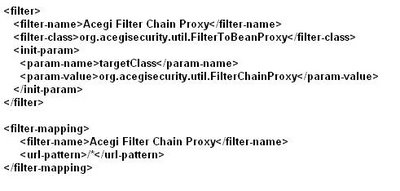
security-acegi-security.xml
filterInvocationDefinitionSource - httpSessionContextIntegrationFilter, authenticationProcessingFilter, exceptionTranslationFilter, filterSecurityInterceptor

Recently we decided to move security part from SecurityFilter to Acegi. It took me 3 days to finish switch. Seems Acegi integrate to our current system pretty well.
Currently our environment is: Tomcat5.5, Spring2, mySQL5, Hibernate3, Java1.5. Following list some simple steps:
web.xml
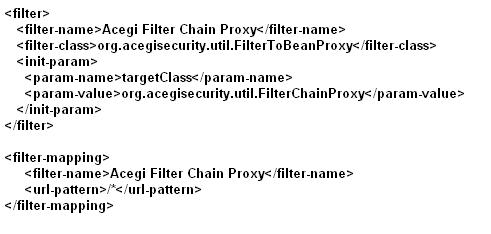
security-acegi-security.xml
filterInvocationDefinitionSource - httpSessionContextIntegrationFilter, authenticationProcessingFilter, exceptionTranslationFilter, filterSecurityInterceptor

Sunday, December 03, 2006
BIRT v.s. JasperReport
BIRT is an Eclipse-based open source reporting system for web applications, especially those based on Java and J2EE.
Jasper Report is a powerful open source Java reporting tool that has the ability to deliver rich content onto the screen, to the printer or into PDF, HTML, XLS, CSV and XML files.
JasperReports
- Easiest integrate to application and flexible from a developers standpoint.
- Supports a large number of export formats.
- Do not have free report designer tool.
Eclipse BIRT
- Excellent report designer and charting support. I can get create reports in a matter of minutes with great ease.
- Great support for reports with multiple datasources. However, it is also tedious to maintain extra datasource just for report.
- Harder to integrate into currently application.
Currently, when I deploy report to BIRT under tomcat environment. I need deploy it to a separate application. This application is totally used to handle all reports. For small application, it makes things complex and I am strong worry about its security. I also try to integrate BIRT report to my application, however it makes my WAR file pretty big (20M more).
BIRT is still a relatively young project and there lots more work that needs to be done. Maybe I need wait for next BIRT release.
Because my application is using spring framework. It does support a view to pretty easy integrate my JasperReport. This allow me to focus on my report design instead of other stuff. At the same time, code is pretty small and clean. So I decide to choose JasperReport as my report engine temporary.
Pro Spring has a good example shows how to integrate JasperReport into your application.

The order of this configure file is pretty important. First, it should be general viewResolver, then comes japserReportViewResolver.
Jasper Report is a powerful open source Java reporting tool that has the ability to deliver rich content onto the screen, to the printer or into PDF, HTML, XLS, CSV and XML files.
JasperReports
- Easiest integrate to application and flexible from a developers standpoint.
- Supports a large number of export formats.
- Do not have free report designer tool.
Eclipse BIRT
- Excellent report designer and charting support. I can get create reports in a matter of minutes with great ease.
- Great support for reports with multiple datasources. However, it is also tedious to maintain extra datasource just for report.
- Harder to integrate into currently application.
Currently, when I deploy report to BIRT under tomcat environment. I need deploy it to a separate application. This application is totally used to handle all reports. For small application, it makes things complex and I am strong worry about its security. I also try to integrate BIRT report to my application, however it makes my WAR file pretty big (20M more).
BIRT is still a relatively young project and there lots more work that needs to be done. Maybe I need wait for next BIRT release.
Because my application is using spring framework. It does support a view to pretty easy integrate my JasperReport. This allow me to focus on my report design instead of other stuff. At the same time, code is pretty small and clean. So I decide to choose JasperReport as my report engine temporary.
Pro Spring has a good example shows how to integrate JasperReport into your application.

The order of this configure file is pretty important. First, it should be general viewResolver, then comes japserReportViewResolver.
Friday, October 20, 2006
J2EE without EJB feature lists
Tomcat - Application Server
Spring 2.0 - J2EE framework
Hibernate/iBatis - ORM
JSF/Spring/WebWork - Multi-Action Web Framework
JSP - View Template
Dojo, YUI/Extension, Rico, Prototype - Rich Client Widgets
Acegi - Authentication and authorization.
SiteMesh - Web page layout and decoration framework.
Quartz - Enterprise job scheduler.
Log4j - Logging Tool
OSCache - Simple Cache and Web Cache solution
Jasper Report - Report Engine
Lucene - Search engine
ExtremeTable - JSP Table Tag Libraries.
Junit - unit test
Spring 2.0 - J2EE framework
Hibernate/iBatis - ORM
JSF/Spring/WebWork - Multi-Action Web Framework
JSP - View Template
Dojo, YUI/Extension, Rico, Prototype - Rich Client Widgets
Acegi - Authentication and authorization.
SiteMesh - Web page layout and decoration framework.
Quartz - Enterprise job scheduler.
Log4j - Logging Tool
OSCache - Simple Cache and Web Cache solution
Jasper Report - Report Engine
Lucene - Search engine
ExtremeTable - JSP Table Tag Libraries.
Junit - unit test
Friday, September 15, 2006
AOP and OOP
AOP - Aspect Oriented Programming provides us the ability to interpose customer behavor before/after invocations on any object. This enable us to address crosscutting enterprise concerns that apply to multiple object.
OOP works well in general, AOP is a complementing rather than competing with OOP. For example, if we have to apply the same transactional behavior to multiple objects and methods, we need cut/paste the same code into each method. AOP give us a better way to pack such concerns into ASPECTS.
OOP works well in general, AOP is a complementing rather than competing with OOP. For example, if we have to apply the same transactional behavior to multiple objects and methods, we need cut/paste the same code into each method. AOP give us a better way to pack such concerns into ASPECTS.
Tuesday, July 04, 2006
How to bind and validate in MultiActionController
In Spring framework, it provides several controller in MVC model. Personaly, I like the MultiActionController best. And I do not like SimpleFormController because it only one "onSubmit" method. For WEB page, I do not think any page just have one button, i.e: "Save" or "Update". However, SimpleFormController have strong validator ability. But I still hate lots of configure in SimpleFormController.
In Spring MultiActionController, it already provides bind method, however, this method just throws Exception when it find the invalidate error message. To catch this error, we need write a new method to override it.
The goal is to use both MultiActionController and SimpleFormController
Solution: bind and validate in MultiActionController.
In XML, you can write your MultiActionController as normal define.

Now we need bind the form and validator it.
I will use a save action as example:
First create a bindObject method in your BaseContoller (extends MultiActionController)
Now in the save action, you can use this method as normal.
In this way, I can easy to fix my problem when I use MultiActionController. I can bind and validate any object as I like.
In Spring MultiActionController, it already provides bind method, however, this method just throws Exception when it find the invalidate error message. To catch this error, we need write a new method to override it.
The goal is to use both MultiActionController and SimpleFormController
Solution: bind and validate in MultiActionController.
In XML, you can write your MultiActionController as normal define.

Now we need bind the form and validator it.
I will use a save action as example:
First create a bindObject method in your BaseContoller (extends MultiActionController)
protected BindException bindObject(HttpServletRequest request,
   Object command, Validator validator) throws Exception {
    preBind(request, command);
    ServletRequestDataBinder binder = createBinder(request, command);
    binder.bind(request);

    BindException errors = new BindException(command,
    getCommandName(command));
    if (validator.supports(command.getClass())) {
       ValidationUtils.invokeValidator(validator, command, errors);
    }

    return errors;
}
Now in the save action, you can use this method as normal.
public ModelAndView save(HttpServletRequest request,
   HttpServletResponse response, PhoneInfo command) throws Exception {
  ModelAndView addPhoneView = new ModelAndView(LIST_VIEW, "phones",
    phones);
  addPhoneView.addObject("phoneInfo", command);

  // add validator and call bindobject to get the result
  BindException errors = super.bindObject(request, command, new PhoneInfoValidator());
  if (errors.hasErrors()) {
   addPhoneView.addAllObjects(errors.getModel());
   return addPhoneView;
  }

  // otherwise --- save this object...
  return addPhoneView;
 }
In this way, I can easy to fix my problem when I use MultiActionController. I can bind and validate any object as I like.
Friday, June 30, 2006
Hibernate ?
Hibernate is a good ORM tool. However, there also have some issue in here:
1: Criteria API, QueryObject are not as strong as sql language.
2: Lazy load or not... only define one time in XML
3: POJO ? too much use ?
1: Criteria API, QueryObject are not as strong as sql language.
2: Lazy load or not... only define one time in XML
3: POJO ? too much use ?
Friday, June 02, 2006
Thursday, May 18, 2006
Google Ajax
http://code.google.com/webtoolkit/
Some good tool for Ajax
prototype.js is a JavaScript library written by Sam Stephenson. This amazingly well thought and well written piece of standards-compliant code takes a lot of the burden associated with creating rich, highly interactive web pages that characterize the Web 2.0 off your back.
Some good tool for Ajax
prototype.js is a JavaScript library written by Sam Stephenson. This amazingly well thought and well written piece of standards-compliant code takes a lot of the burden associated with creating rich, highly interactive web pages that characterize the Web 2.0 off your back.
Thursday, April 20, 2006
Spring lightweight?
Today, indeed Spring cannot be considered as “lightweight” when comparing it to other light solutions out there. this is mainly due to the vast amount of solutions it provides in almost all aspects of enterprise development. I guess “lightweight”, when taking it by its literal meaning, is somewhat inappropriate nowadays… perhaps “simple and comprehensive” is more suitable to describe Spring. But this term (I think) is not interpreted by its literal meaning. I think it’s still associated with its original meaning when it was compared with the heavy EJB containers.
Wednesday, February 22, 2006
Jasper and Open Reports
In the end we compared Crystal reports with Jasper Reports, and Jasper was picked. Jasper is not only free, but also is proven in the Java world, and has a lot of users. It is customizable, since its Java and open source, and has support for using Collections or Lists of Business Objects, such as those populated via Hibernate.
Once Jasper was chosen, I tested several GUI’s to help build the reports instead of editing them strictly in their native XML. JasperAssistant was found to be the best of all of them, and integrates seamlessly with Eclipse. If you are an Eclipse fan as I am, then you’ll love using JasperAssistant. It even allows you to preview the report against your database right in Eclipse.
Once Jasper was chosen, I tested several GUI’s to help build the reports instead of editing them strictly in their native XML. JasperAssistant was found to be the best of all of them, and integrates seamlessly with Eclipse. If you are an Eclipse fan as I am, then you’ll love using JasperAssistant. It even allows you to preview the report against your database right in Eclipse.
Monday, January 16, 2006
Connecting Apache's Web Server to Multiple Instances of Tomcat
Connecting Apache's Web Server to Multiple Instances of Tomcat
http://www.linuxjournal.com/node/8561/print
http://www.linuxjournal.com/node/8561/print
Thursday, January 12, 2006
Wednesday, January 11, 2006
Voice Application with J2EE
I'm convinced that J2EE lightweight container architecture is the right way to go for the majority of voice applications. However, there needs to be some tweaks in the way the UI tier utilizes it, compared to what we're used to seeing with HTML-based applications.
The standard platform architecture for Voice Application is to have 100 or so browser instances sitting on a server. The browser is not located on the client, because the client is a POT (Plain Old Telephone). The caller dials up a computer with a Dialogic or NMS card, or a SIP gateway, and the call is routed to one of the browser instances running on a server. This may be the same server that's running the app server, or it may just be on the same LAN.
So now the browser cache becomes much, much more important. If I have a few thousand phone calls coming in every hour to those 100 browsers, and they're all running the same application, the absolute worst thing I can do is a lot of dynamic page rendering. That would involve parsing the JSP into VoiceXML, and parsing the VoiceXML into runnable code, on every request.
So, component libraries like Tapestry or JSF are out. MVC frameworks like struts could be okay, as long as they're redirecting to static VoiceXML pages, instead of forwarding to JSPs.
The standard platform architecture for Voice Application is to have 100 or so browser instances sitting on a server. The browser is not located on the client, because the client is a POT (Plain Old Telephone). The caller dials up a computer with a Dialogic or NMS card, or a SIP gateway, and the call is routed to one of the browser instances running on a server. This may be the same server that's running the app server, or it may just be on the same LAN.
So now the browser cache becomes much, much more important. If I have a few thousand phone calls coming in every hour to those 100 browsers, and they're all running the same application, the absolute worst thing I can do is a lot of dynamic page rendering. That would involve parsing the JSP into VoiceXML, and parsing the VoiceXML into runnable code, on every request.
So, component libraries like Tapestry or JSF are out. MVC frameworks like struts could be okay, as long as they're redirecting to static VoiceXML pages, instead of forwarding to JSPs.
Reusable Dialog Component (RDC) for voice application
A Reusable Dialog Component (RDC) is basically a JSP 2.0 tag, which generates VoiceXML at runtime. RDCs are part of the RDC Tag Library open source Jakarta project. Version 1.0 of the RDC Taglib was released in July 2005. The RDC Taglib projects implifies the development of server-side code in order to generate Voice XML. The RDC Taglib project includes a set of RDCs, which are a collection of JSP 2.0 tags that assist in the development of Voice applications. The RDC tags generate VoiceXML at runtime, which can execute on any VoiceXML 2.0 compliant platform. The RDC Taglib also provides a framework for implementing additional RDCs. The framework helps in orchestrating each individual RDC making sure the user data is collected, verified, and canonicalized. The collection of RDCs included in the Taglib project is made up of both, atomic and composite RDCs. Atomic RDCs collect a single piece of information from the user. For example, date, time, or zipCode are atomic RDCs. Composite RDCs collect multiple pieces of information from a user. These are usually done by using atomic RDCs or aggregating a composite with other atomic RDCs.
Friday, December 02, 2005
File transfer between .NET and J2EE
Web service seems a good solution for file transfer between .NET and J2EE platform. However, .NET environment is only support DIME format for attachment.
Direct Internet Message Encapsulation (DIME) is a new specification for sending and receiving SOAP messages along with additional attachments, like binary files, XML fragments, and even other SOAP messages, using standard transport protocols like HTTP.
Direct Internet Message Encapsulation (DIME) is a new specification for sending and receiving SOAP messages along with additional attachments, like binary files, XML fragments, and even other SOAP messages, using standard transport protocols like HTTP.
Thursday, November 10, 2005
Session and sessionContext
In the 2.0 version of the Servlet API, you could get hold of a HttpSessionContext object by calling getSessionContext() off an HttpSession. For example:
HttpSessionContext sessionContext = theSession.getSessionContext();
Although HttpSessionContext seems like a useful class for getting easy access to all client sessions, it appears Sun thought access to such private data was too easy. In version 2.1 of the Servlet API the HttpSessionContext class was deprecated for security reasons by Sun, with no plans for a replacement. In short, steer clear of HttpSessionContext!
Wednesday, October 19, 2005
Monday, October 17, 2005
Lucene - text search engine
Apache Lucene is a high-performance, full-featured text search engine Information Retrieval (IR) library written entirely in Java. It is a technology suitable for nearly any application that requires full-text search, especially cross-platform. It lets you add indexing and searching capabilities to your applications.
Monday, October 10, 2005


Saturday, October 08, 2005
Quick Solution for Existing Web Application Security
Web applications are becoming more popular software for the customer. As web application go online, security parts need to be pay attention to. Problems arise when the application can not distinguish between legitimate and illegitimate requests coming from a browser.
Through a Web browser, I touch my account information. I also touch your account information. Web application server need to validate whether I have permission to touch your account information. However, server side form date validation is really time consuming and sometimes it is nearly impossible, especially for existing web application system.
In this paper, an DES two-ways encryption/decryption are introduced in the form data validate in the web application.
Using GET/POST, some sensitive data are display in the user HTML forms or URL. For example:
http://www.yourdomain.com/accounts/editAccount.do?aId=5
Anyone can easily change the aId value and submit the changed URL to the server. One solution for this is check this user permission on the server side. Another way, we also can check whether client changed the aId, I means the aId I passed and the aId I receive.
To see whether client changes the sensitive data, the DES encrypting algorithm is used in the system. The example code is list at the end of this paper[1]:
For the above URL, I encrypted the sensitive data with the DES algorithm before passing it to the remote client. Now the client browser get the following URL:
http://www.yourdomain.com/accounts/editAccount.do?aId=SMsDoJFsmlc=5
As above example, the encrypt result is “SMsDoJFsmlc=”, the original value is “5”. When the client submit this URL to the server side, I get the encrypted aId from the request, call the decrypt(String) and get the original value.
Now suppose we change the aId as something else, this will make the decrypt result and original data value does not match. We know the client changed the value and just reject the client request.Thursday, October 06, 2005
Securing the application with SecurityFilter
Enterprise-level business applications need rigorous security regulations with varying roles; each role also requires its own set of access control lists. These roles become more important in Web-based applications, which are accessible to a wider audience. In most cases, application security must control access to each attribute that's visible on the screen.
When access to web applications needs to be restricted to certain users and groups, Tomcat provides its realm implementations. A realm groups a collection of web resources together and puts a protection mechanism around them that requires users who wish to access them to authenticate themselves, and for Tomcat to check their authorization. However, tomcat does not did enough for real application. Here comes SecurityFilter which built on the top of tomcat.
SecurityFilter is a Java Servlet Filter that mimics container managed security. It provides robust security and automatic authentication services for web applications.
When access to web applications needs to be restricted to certain users and groups, Tomcat provides its realm implementations. A realm groups a collection of web resources together and puts a protection mechanism around them that requires users who wish to access them to authenticate themselves, and for Tomcat to check their authorization. However, tomcat does not did enough for real application. Here comes SecurityFilter which built on the top of tomcat.
SecurityFilter is a Java Servlet Filter that mimics container managed security. It provides robust security and automatic authentication services for web applications.


Wednesday, October 05, 2005
Unit Testing with JUnit
JUnit provides the following features:
It provides an API that allows us to create a repeatable unit test with a clear pass/fail result.
It includes tools for running our tests and presenting the results.
It allows multiple tests to be grouped together to run in a batch.
It is very lightweight and simple to use. It takes little time to learn how it works.
It is extensible. It's the de facto unit testing framework for Java. There is a large community pf developers using it. Many free extensions are available to help us use it in specific situation. Plus, countless articles and books on the subject are avaibale.
It provides an API that allows us to create a repeatable unit test with a clear pass/fail result.
It includes tools for running our tests and presenting the results.
It allows multiple tests to be grouped together to run in a batch.
It is very lightweight and simple to use. It takes little time to learn how it works.
It is extensible. It's the de facto unit testing framework for Java. There is a large community pf developers using it. Many free extensions are available to help us use it in specific situation. Plus, countless articles and books on the subject are avaibale.
Page Decorate with SiteMesh
SiteMesh is a web-page layout and decoration framework and web- application integration framework to aid in creating large sites consisting of many pages for which a consistent look/feel, navigation and layout scheme is required.
SiteMesh intercepts requests to any static or dynamically generated HTML page requested through the web-server, parses the page, obtains properties and data from the content and generates an appropriate final page with modifications to the original. This is based upon the well-known GangOfFour Decorator design pattern.
SiteMesh can also include entire HTML pages as a Panel within another page. This is similar to a Server-Side Include, except that the HTML document will be modified to create a visual window (using the document's Meta-data as an aid) within a page. Using this feature, Portal type web sites can be built very quickly and effectively. This is based upon the well-known GangOfFour Composite design pattern.
SiteMesh is built using Java 2 with Servlet, JSP and XML technologies. This makes it ideal for use with J2EE applications, however it can be integrated with server-side web architectures that are not Java based such as CGI (Perl/Python/C/C++/etc), PHP, Cold Fusion, etc...
SiteMesh is very extensible and is designed in a way in which it is easy to extend for custom needs.
http://www.opensymphony.com/sitemesh/
SiteMesh intercepts requests to any static or dynamically generated HTML page requested through the web-server, parses the page, obtains properties and data from the content and generates an appropriate final page with modifications to the original. This is based upon the well-known GangOfFour Decorator design pattern.
SiteMesh can also include entire HTML pages as a Panel within another page. This is similar to a Server-Side Include, except that the HTML document will be modified to create a visual window (using the document's Meta-data as an aid) within a page. Using this feature, Portal type web sites can be built very quickly and effectively. This is based upon the well-known GangOfFour Composite design pattern.
SiteMesh is built using Java 2 with Servlet, JSP and XML technologies. This makes it ideal for use with J2EE applications, however it can be integrated with server-side web architectures that are not Java based such as CGI (Perl/Python/C/C++/etc), PHP, Cold Fusion, etc...
SiteMesh is very extensible and is designed in a way in which it is easy to extend for custom needs.
http://www.opensymphony.com/sitemesh/
Web Application Framework Compare
Apache Struts framework
Pros:
The “Standard” - lots of Struts jobs
Lots of information and examples
HTML tag library is one of the best
ActionForms - they’re a pain
Can’t unit test - StrutsTestCase only does integration
Project has been rumored as “dead”
Pros:
Lifecyle for overriding binding, validation, etc.
Integrates with many view options seamlessly: JSP/JSTL, Tiles, Velocity, FreeMarker, Excel, XSL, PDF
Inversion of Control makes it easy to test
Configuration intensive - lots of XML
Requires writing lots of code in JSPs
Almost too flexible - no common parent Controller
Pros:
Simple architecture - easy to extend
Tag Library is easy to customize - backed by Velocity
Interceptors are pretty slick
Small Community
Documentation only recently written, few examples
Client-side validation immature
Pros:
J2EE Standard - lots of demand and jobs
Fast and easy to develop with
Rich Navigation framework
Tag soup for JSPs
Immature technology - doesn’t come with everything
No single source for implementation
Pros:
The “Standard” - lots of Struts jobs
Lots of information and examples
HTML tag library is one of the best
ActionForms - they’re a pain
Can’t unit test - StrutsTestCase only does integration
Project has been rumored as “dead”
Pros:
Lifecyle for overriding binding, validation, etc.
Integrates with many view options seamlessly: JSP/JSTL, Tiles, Velocity, FreeMarker, Excel, XSL, PDF
Inversion of Control makes it easy to test
Configuration intensive - lots of XML
Requires writing lots of code in JSPs
Almost too flexible - no common parent Controller
Pros:
Simple architecture - easy to extend
Tag Library is easy to customize - backed by Velocity
Interceptors are pretty slick
Small Community
Documentation only recently written, few examples
Client-side validation immature
Pros:
J2EE Standard - lots of demand and jobs
Fast and easy to develop with
Rich Navigation framework
Tag soup for JSPs
Immature technology - doesn’t come with everything
No single source for implementation
Why use Hibernate?
One of the most complicated and time-consuming tasks of developing an enterprise application is writing the code to store and load data from a database at the appropriate times. Hibernate is the right tool to remedy this.
Hibernate is a powerful, ultra-high performance object/relational persistence and query service for Java. Hibernate lets you develop persistent classes following common Java idiom - including association, inheritance, polymorphism, composition, and the Java collections framework. Hibernate allows you to express queries in its own portable SQL extension (HQL), as well as in native SQL, or with Java-based Criteria and Example objects.
Hibernate allows us mapping an object model to a relational schema, keeping object model and database schema in sync. It also makes us easy persisting and retrieving an object from database.
www.hibernate.org
Hibernate is a powerful, ultra-high performance object/relational persistence and query service for Java. Hibernate lets you develop persistent classes following common Java idiom - including association, inheritance, polymorphism, composition, and the Java collections framework. Hibernate allows you to express queries in its own portable SQL extension (HQL), as well as in native SQL, or with Java-based Criteria and Example objects.
Hibernate allows us mapping an object model to a relational schema, keeping object model and database schema in sync. It also makes us easy persisting and retrieving an object from database.
www.hibernate.org
Subscribe to:
Posts (Atom)